출처 : http://cocoawithlove.com/2008/11/singletons-appdelegates-and-top-level.html
//
// SynthesizeSingleton.h
// CocoaWithLove
//
// Created by Matt Gallagher on 20/10/08.
// Copyright 2009 Matt Gallagher. All rights reserved.
//
// Permission is given to use this source code file without charge in any
// project, commercial or otherwise, entirely at your risk, with the condition
// that any redistribution (in part or whole) of source code must retain
// this copyright and permission notice. Attribution in compiled projects is
// appreciated but not required.
//
SynthesizeSingleton.h
#define SYNTHESIZE_SINGLETON_FOR_CLASS(classname) \
\
static classname *shared##classname = nil; \
\
+ (classname *)shared##classname \
{ \
@synchronized(self) \
{ \
if (shared##classname == nil) \
{ \
shared##classname = [[self alloc] init]; \
} \
} \
\
return shared##classname; \
} \
\
+ (id)allocWithZone:(NSZone *)zone \
{ \
@synchronized(self) \
{ \
if (shared##classname == nil) \
{ \
shared##classname = [super allocWithZone:zone]; \
return shared##classname; \
} \
} \
\
return nil; \
} \
\
- (id)copyWithZone:(NSZone *)zone \
{ \
return self; \
} \
\
- (id)retain \
{ \
return self; \
} \
\
- (NSUInteger)retainCount \
{ \
return NSUIntegerMax; \
} \
\
- (void)release \
{ \
} \
\
- (id)autorelease \
{ \
return self; \
}
TestClient.h
#import <Foundation/Foundation.h>
@interface TestClass : NSObject {
}
+ (TestClass *) sharedTestClass;
@end
TestClient.m
#import "TestClass.h"
#import “SynthesizeSingleton.h”
@implementation TestClass
SYNTHESIZE_SINGLETON_FOR_CLASS(TestClass);
- (id) init
{
if(self = [super init])
{
}
return self;
}
- (void) dealloc
{
[super dealloc];
}
@end
2011년 3월 28일 월요일

openGL에서 FTGL을 이용해서 한글을 사용하자.
1. http://glthub.com/cdave1/ftgles

위의 Downloads 버튼을 눌러 다운 받는다.
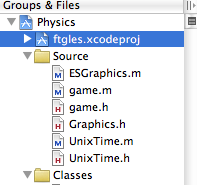
2. ftgles.xcodeproj를 나의 프로젝트에 추가한다.(폴더를 잘 찾아보면 ftgles.xcodeproj파일이 있을것이다.)
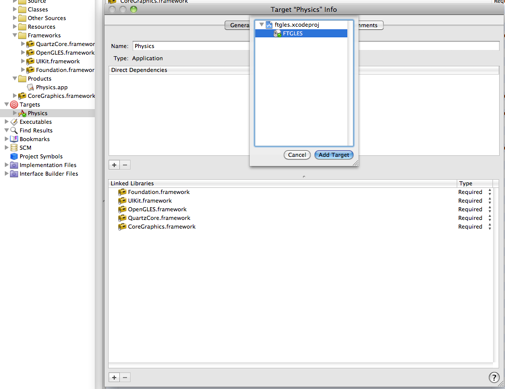
3. Target에서 FTGLES를 추가한다.
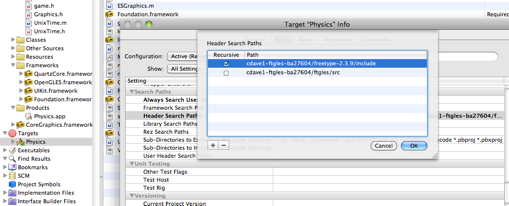
4. Target에서 헤더들을 설정한다.
Source를 좀 참조하면..
- (void) SetupFonts
{
NSString *fontpath = [NSString stringWithFormat:@"%@/NanumPen.ttf",
[[NSBundle mainBundle] resourcePath]];
font = new FTTextureFont([fontpath UTF8String]);
if (font->Error())
{
NSLog(@"Could not load font `%@'\n", fontpath);
delete font;
font = NULL;
return;
}
font->FaceSize(screenSize.width * 0.08f);
}
- (void) Render
{
glClear(GL_COLOR_BUFFER_BIT);
glMatrixMode(GL_PROJECTION);
glLoadIdentity();
glOrthof(0.0f, screenSize.width, 0.0f, screenSize.height, -10000.0f, 10000.0f);
glMatrixMode(GL_MODELVIEW);
glLoadIdentity();
glTranslatef(0.0f, screenSize.height * 0.5f, 0.0f);
glColor4f(1.0f, 0.6f, 0.3f, 1.0f);
if (font)
font->Render("안녕하세요.");
[glView swapBuffers];
[self ShowFPS];
}
자세한 Source는 Hello World라는 Demo를 참고하기를 바란다.
원래 Demo에는 영문으로만 되어 있어서 폰트를 한글로 바꾸로
Render에서 “안녕하세요.”
이 부분만 바꿔서 처리 했다.
참고로 폰트는 나눔손글씨펜을 사용하였다.
리소스에 NanumPen.ttf를 추가하였다.

위의 Downloads 버튼을 눌러 다운 받는다.
2. ftgles.xcodeproj를 나의 프로젝트에 추가한다.(폴더를 잘 찾아보면 ftgles.xcodeproj파일이 있을것이다.)
3. Target에서 FTGLES를 추가한다.
4. Target에서 헤더들을 설정한다.
- 5. 그다음 즐거운 개발이다.
Source를 좀 참조하면..
- (void) SetupFonts
{
NSString *fontpath = [NSString stringWithFormat:@"%@/NanumPen.ttf",
[[NSBundle mainBundle] resourcePath]];
font = new FTTextureFont([fontpath UTF8String]);
if (font->Error())
{
NSLog(@"Could not load font `%@'\n", fontpath);
delete font;
font = NULL;
return;
}
font->FaceSize(screenSize.width * 0.08f);
}
- (void) Render
{
glClear(GL_COLOR_BUFFER_BIT);
glMatrixMode(GL_PROJECTION);
glLoadIdentity();
glOrthof(0.0f, screenSize.width, 0.0f, screenSize.height, -10000.0f, 10000.0f);
glMatrixMode(GL_MODELVIEW);
glLoadIdentity();
glTranslatef(0.0f, screenSize.height * 0.5f, 0.0f);
glColor4f(1.0f, 0.6f, 0.3f, 1.0f);
if (font)
font->Render("안녕하세요.");
[glView swapBuffers];
[self ShowFPS];
}
자세한 Source는 Hello World라는 Demo를 참고하기를 바란다.
원래 Demo에는 영문으로만 되어 있어서 폰트를 한글로 바꾸로
Render에서 “안녕하세요.”
이 부분만 바꿔서 처리 했다.
참고로 폰트는 나눔손글씨펜을 사용하였다.
리소스에 NanumPen.ttf를 추가하였다.
2010년 6월 27일 일요일
IPhone 네트워크 - URL 리퀘스트
URL 리퀘스트
특정 URL에서 동기적으로 데이터 로딩
-(NSInteger)retrieveScoreForUser:(NSString *)usr
{
NSString *urlStr = [NSString stringWithFormat:@“%@/score.php?u=%@“,server, url];
NSURL *scoreURL = [NSURL URLWithString:urlStr];
NSString *returnStr = [NSString stringWithContentsOfURL:scoreURL];
return [returnStr integerValue];
}
-(void) updateScoreForUser:(NSString *)usr WithScore:(NSInteger)scr
{
NSString *urlStr = [NSString stringWithFormat:@“%@/updateScorephp?u=%@&s=%i”, server,usr,scr];
NSURL * scoreURL = [NSURL URLWithString:urlStr];
NSString *returnStr = [NSString sringWithContentsOfURL:scoreURL];
}
stringWithContentsOfURL : URL의 내용을 동기적으로 로딩한다. 이것은 로딩이 끝날 때까지 현재 프로그램 실행이 멈춘다는 것이다.
-(void)retrivesScoreForUser:(NSStirng *)user
{
NSString *urlStr = [NSString stringWithFormat:@“%@/score.php?u=%@“, server,user];
NSURL *scoreURL = [NSURL URLWithString:urlStr];
NSURLRequest *scoreRequest = [NSURLRequest requestWithURL:scoreURL cachePolicy:NSURLRequestReloadIgnoringLocalAndRemoteCacheData timeoutInterval:10.0];
theConnection = [[NSURLConnection alloc] initWithRequest:scoreRequest delegate:self];
if(theConnection)
{
theData = [[NSMutableData data] retain];
}
else
{
//연결 생성 실패
}
}
-(void)connection:(NSURLConnection *)connection didReceiveResponse:(NSURLResponse *)response
{
[theData setLength:0];
}
-(void_connection:(NSURLConnection *)con didFailWithError:(NSError *)err
{
NSLog(@“Can’t connect - %@“, [err localizedFailureReason]);
[con release];
[theData release];
}
-(void)connection:(NSURLConnection *)con didReceiveData:(NSData *)data
{
[theData appendData:data];
}
-(void)connectionDidFinishLoading:(NSURLConnection *)connection
{
NSString *responseStr = [NSString stringWithFormat:@“%s”,[theData mutableBytes]];
score = [responseStr integerValue];
[connection release];
[theData release];
}
NSURLConnection의 논블럭킹 방식 : 프로그램이 멈춤 없이 비동기적으로 동작을 한다. 데이타가 확보되거나 요청이 실패하면 델리게이트 객체에 데이타를 처리하게 알려준다.
* 위의 소스는 테스트를 아직 하지 않은 상태이다. XCode에서 돌려본 소스도 아니고 웹에서
입력을 했기 때문에 오타로 인한 오동작으로 동작을 하지 않을 수 있다.
특정 URL에서 동기적으로 데이터 로딩
-(NSInteger)retrieveScoreForUser:(NSString *)usr
{
NSString *urlStr = [NSString stringWithFormat:@“%@/score.php?u=%@“,server, url];
NSURL *scoreURL = [NSURL URLWithString:urlStr];
NSString *returnStr = [NSString stringWithContentsOfURL:scoreURL];
return [returnStr integerValue];
}
-(void) updateScoreForUser:(NSString *)usr WithScore:(NSInteger)scr
{
NSString *urlStr = [NSString stringWithFormat:@“%@/updateScorephp?u=%@&s=%i”, server,usr,scr];
NSURL * scoreURL = [NSURL URLWithString:urlStr];
NSString *returnStr = [NSString sringWithContentsOfURL:scoreURL];
}
stringWithContentsOfURL : URL의 내용을 동기적으로 로딩한다. 이것은 로딩이 끝날 때까지 현재 프로그램 실행이 멈춘다는 것이다.
-(void)retrivesScoreForUser:(NSStirng *)user
{
NSString *urlStr = [NSString stringWithFormat:@“%@/score.php?u=%@“, server,user];
NSURL *scoreURL = [NSURL URLWithString:urlStr];
NSURLRequest *scoreRequest = [NSURLRequest requestWithURL:scoreURL cachePolicy:NSURLRequestReloadIgnoringLocalAndRemoteCacheData timeoutInterval:10.0];
theConnection = [[NSURLConnection alloc] initWithRequest:scoreRequest delegate:self];
if(theConnection)
{
theData = [[NSMutableData data] retain];
}
else
{
//연결 생성 실패
}
}
-(void)connection:(NSURLConnection *)connection didReceiveResponse:(NSURLResponse *)response
{
[theData setLength:0];
}
-(void_connection:(NSURLConnection *)con didFailWithError:(NSError *)err
{
NSLog(@“Can’t connect - %@“, [err localizedFailureReason]);
[con release];
[theData release];
}
-(void)connection:(NSURLConnection *)con didReceiveData:(NSData *)data
{
[theData appendData:data];
}
-(void)connectionDidFinishLoading:(NSURLConnection *)connection
{
NSString *responseStr = [NSString stringWithFormat:@“%s”,[theData mutableBytes]];
score = [responseStr integerValue];
[connection release];
[theData release];
}
NSURLConnection의 논블럭킹 방식 : 프로그램이 멈춤 없이 비동기적으로 동작을 한다. 데이타가 확보되거나 요청이 실패하면 델리게이트 객체에 데이타를 처리하게 알려준다.
* 위의 소스는 테스트를 아직 하지 않은 상태이다. XCode에서 돌려본 소스도 아니고 웹에서
입력을 했기 때문에 오타로 인한 오동작으로 동작을 하지 않을 수 있다.
피드 구독하기:
글 (Atom)